Synq.
One workspace for everything your team does
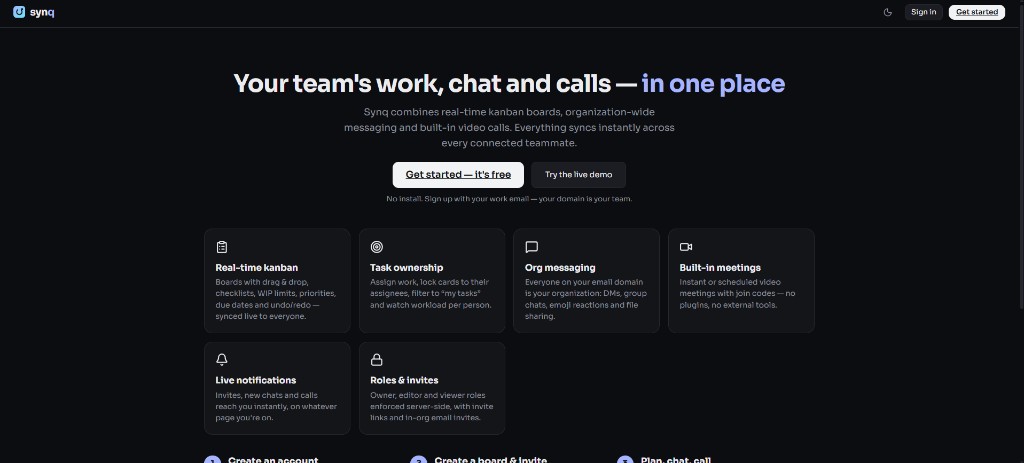
Chat like Slack. Meet like Google Meet. Plan like Jira. All in one place.
Synq brings conversations, video meetings, task boards, calendar and notifications together in a single, fast, real-time workspace — no more paying for four tools or losing decisions between apps.
- Real-time kanban, messaging and video in one product
- Domain-based org onboarding with role-based access
- Deployable entirely on free-tier cloud services
What’s inside.
Messaging
Channels, group chats and DMs with threads, @mentions, reactions, file sharing, typing indicators, unread badges, search and presence.
Meetings
Instant or scheduled video calls from any chat with `/meet`. Lobby, screen sharing, grid layouts and peer-to-peer WebRTC for low latency.
Task boards
Kanban with WIP limits, priorities, labels, due dates, checklists, assignees, card locking, filters and sprint/retro templates.
Calendar & reminders
Week view of meetings, deadlines and reminders — with in-app toasts, inbox entries, sound and desktop notifications when time is up.
Today dashboard
Next meeting, tasks due, threads needing replies and universal search across boards, tasks, people and conversations.
Insights & analytics
Per-board workload, overdue items and priority breakdown plus org-wide overview for spotting bottlenecks early.
Roles, admin & security
Owner/editor/viewer roles enforced server-side, superadmin console, password hashing and token-based sessions on every request.
Connected by design.
Everything in one place — `/task` turns messages into tasks, `/meet` starts calls from any chat, and due dates sync to calendar and notifications.
Truly real-time — boards, chats and dashboards update live for every teammate instantly.
One org, zero setup — company email domains land in the same workspace; invite by link and assign a role.
Free to run — the full platform deploys on free-tier cloud services for startups and side projects.
Startups
Replace 3–4 SaaS subscriptions with one free, self-hosted workspace
Product & engineering
Sprint boards, standups and incident channels in one tool
Agencies
A board per client, chat per project, meetings via link
Student & OSS teams
Free hosting and zero-friction onboarding by email domain
From start to finish.
- 01
Join an organization workspace and bring teammates into shared channels and boards.
- 02
Discuss work in channels or direct messages, and turn conversations into tasks with /task.
- 03
Assign tasks, set priorities and due dates, and move cards through a shared board.
- 04
Start a meeting with /meet or coordinate scheduled meetings and reminders through Calendar.
- 05
Use the Today dashboard and board insights to follow deadlines, replies, and team workload.
Try it for yourself.
Open the Live demo link above and use one of the shared demonstration accounts below. Open a second browser window with another demo account to explore live collaboration.
- Open the live demo and sign in as ali@acme.dev / password123 (org superadmin).
- Check the Today dashboard, then open Messages — try `/meet` in any conversation.
- Open a board in two browser windows and drag the same card — both stay in sync.
- Visit Calendar, click a slot, and set a reminder a minute from now.
Synq demo accounts: ali@acme.dev, sara@acme.dev, omar@acme.dev, emma@acme.dev — password password123.